
World of Sport Competition - 3rd Place

View all entries click here: World of Sport Photo Competition

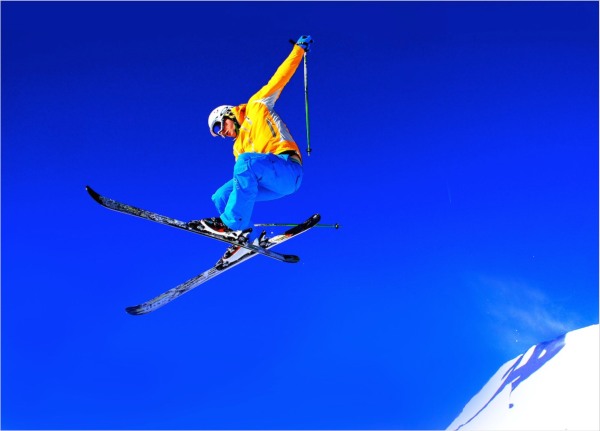
Congratulation to Huw Fairclough with this image entitled 'Flying without wings'.

Huw tells us about the image ''Flying without wings was taken on a skiing holiday in Austria 18-01-2012.. I was using a a Sony A580 with a 18-200mm lens at 27mm…
The skier looks as if he is flying high but in fact he is only a few feet off the ground, I adopted a low position lying on the ground to give a sense of height. The camera was used on shutter priority @1000 of a second to freeze frame the action. What also helps this image, is the vibrant colours of the skier. My son was getting more air and moves but because he was wearing brown, he did not stand out so much.''
  • World of Sport Competition

1st Place see HERE
2nd Place see HERE
3rd Place see HERE
Highly Commended images see HERE



SISLP Sponsor Banner Control Panel 1.7

SISLP Sponsor Banner Control Panel 1.7

Error:


Script Error

Error:

Can't verify file locking - aborting.

Make sure the following has been observed:

Unix Servers:
  • sponsorban.cgi is writable by this script
  • If a file locking problem, make sure the directory this script resides in is writable. Note, the directory does not have to be writable for the script to write to files, only for it to create files. File creation is required for proper file locking.
Windows NT systems:
  • sponsorban.cgi must be writable and accessible by the script
  • banner.cgi must be able to write to files and create files
  • On some NT systems, the variable near the top of banner.cgi must be set. It is currently set as follows:
      $main::sponsorban_path = "sponsorban";
    Note that under most systems, "." is fine. This specifies that it is set to the current directory. However, some NT systems require the full server path. Contact your system administrator to find the full path to your cgi-bin directory.
If you still have trouble, contact Banner@linc2u.com and I will attempt to help.

Software

Main Menu | Add Banners. Log Out
2000 Software


Sponsor Banner root pages - ACTIVE

Content-type: text/html Professional adventure camera backpacks Expires: Mon, 26 Jul 2001 05:00:00 GMT Pragma: no-cache Cache-Control: no-cache, must-revalidate Content-type: text/html SISLP Sponsor Banner Control Panel 1.7

SISLP Sponsor Banner Control Panel 1.7

Error:


Script Error

Error:

Can't verify file locking - aborting.

Make sure the following has been observed:

Unix Servers:
  • sponsorban.cgi is writable by this script
  • If a file locking problem, make sure the directory this script resides in is writable. Note, the directory does not have to be writable for the script to write to files, only for it to create files. File creation is required for proper file locking.
Windows NT systems:
  • sponsorban.cgi must be writable and accessible by the script
  • banner.cgi must be able to write to files and create files
  • On some NT systems, the variable near the top of banner.cgi must be set. It is currently set as follows:
      $main::sponsorban_path = "sponsorban";
    Note that under most systems, "." is fine. This specifies that it is set to the current directory. However, some NT systems require the full server path. Contact your system administrator to find the full path to your cgi-bin directory.
If you still have trouble, contact Banner@linc2u.com and I will attempt to help.

Software

Main Menu | Add Banners. Log Out
2000 Software


Sponsor Banner root pages - ACTIVE

Expires: Mon, 26 Jul 2001 05:00:00 GMT Pragma: no-cache Cache-Control: no-cache, must-revalidate Content-type: text/html SISLP Sponsor Banner Control Panel 1.7

SISLP Sponsor Banner Control Panel 1.7

Error:


Script Error

Error:

Can't verify lock file for cleanup - aborting.

Make sure the following has been observed:

Unix Servers:
  • sponsorban.cgi is writable by this script
  • If a file locking problem, make sure the directory this script resides in is writable. Note, the directory does not have to be writable for the script to write to files, only for it to create files. File creation is required for proper file locking.
Windows NT systems:
  • sponsorban.cgi must be writable and accessible by the script
  • banner.cgi must be able to write to files and create files
  • On some NT systems, the variable near the top of banner.cgi must be set. It is currently set as follows:
      $main::sponsorban_path = "sponsorban";
    Note that under most systems, "." is fine. This specifies that it is set to the current directory. However, some NT systems require the full server path. Contact your system administrator to find the full path to your cgi-bin directory.
If you still have trouble, contact Banner@linc2u.com and I will attempt to help.

Software

Main Menu | Add Banners. Log Out
2000 Software


Sponsor Banner root pages - ACTIVE


Corporate Partners

Aaduki Photographic Insurance Elinchrom Studio & Portable Lighting MPB


Update cookies preferences